
Accounting Dashboard
Overview Page
- Total customers, vendors, invoices, and bills.
- Cashflow statement.
- Graphs depicting income and expenses.
- Details of income vs. expenses.
- List of account balances.
- Latest income and expenses.
- Recent invoices and bills.
- Storage limit information.
- Income and expense breakdown by category.
- Weekly and monthly statistics for invoices and bills.
- List of recent bills and goals.
Reports Page
The reports section includes account statements, invoice summary, sales report, receivables, payables, bill summary, product stock, cash flow, transaction, income summary, expense summary, income vs. expense, and tax summary.

HRM Dashboard
Overview Page :
- Today’s not clocked-in employees.
- Event calendar.
- Staff details.
- Job details.
- Training details.
- Announcement list.
- Meeting schedule.
Reports Page :
- Payroll report.
- Leave report.
- Monthly attendance report.

CRM Dashboard
Overview Page :
- Total leads, deals, and contracts.
- Lead status and deal status.
- The latest contract list.
Reports Page :
- Lead report.
- Deal report.

Project Dashboard
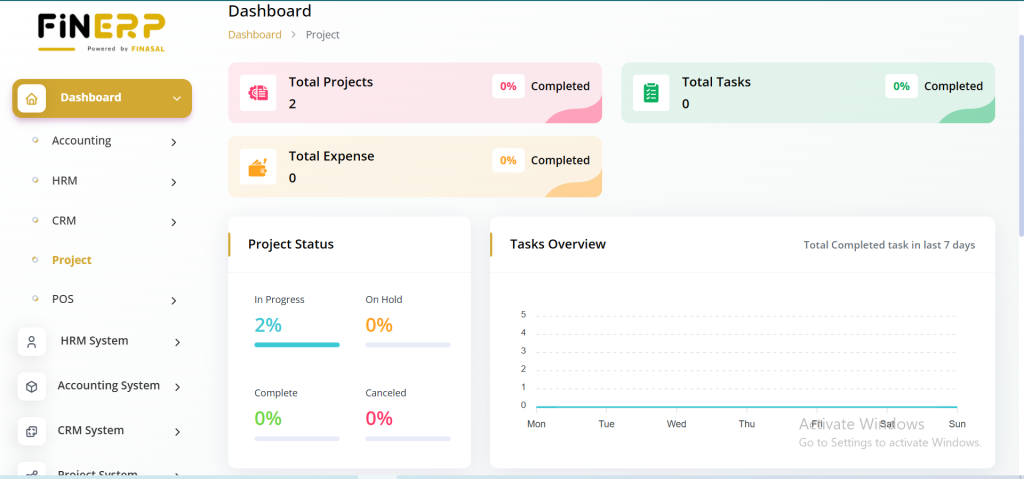
The Fin ERP Admin Dashboard provides a detailed overview of project-related metrics for better management and tracking. Admins can view total projects, tasks, and expenses while monitoring project progress and task performance. The dashboard also highlights top due projects and tasks along with logged timesheet hours for improved productivity insights.
Key Points:
View total projects, tasks, and expenses
Monitor overall project status and task progress
Check top due projects and pending tasks
Track timesheet logged hours for accurate reporting
POS Dashboard
Overview Page :
- Total POS of the month and POS amount.
- Total purchase of the month and purchase amount.
- Purchase vs. POS Amount Graph.
Reports Page :
- Warehouse report.
- Daily and monthly reports for purchases.
- POS, and POS vs. purchase.
Each dashboard is tailored to provide admins with specific insights and functionalities related to their respective domains, enhancing efficiency in managing accounting, HRM, CRM, projects, and POS operations. The detailed reporting options further empower administrators to make informed decisions based on real-time data.
